> ## Documentation Index
> Fetch the complete documentation index at: https://docs-staging-feat-3pa-xaa-myorgs.mintlify.site/llms.txt
> Use this file to discover all available pages before exploring further.

# Coffre-fort

> Décrit comment utiliser le coffre-fort de formulaires pour les actions.

Le coffre-fort vous permet de stocker de manière sécurisée des secrets ou des paramètres courants (par exemple : clés API, jetons d’accès, jetons d’actualisation) pour authentifier les demandes auprès de services externes ou des intégrations en tant que connexions de coffre-fort.

<Callout icon="file-lines" color="#0EA5E9" iconType="regular">
  * Certaines connexions exigent que l’utilisateur fournisse des informations d’identification (par exemple, dans le cas d’une connexion Auth0 avec une application machine-machine (M-M), un jeton d’accès est généré avec un délai d’expiration et un jeton d’actualisation). La connexion stocke les deux jetons et génère un nouveau jeton d’accès avant son expiration.
  * Certains services externes requièrent des permissions pour générer des identifiants d’API. Si vous modifiez les permissions, mettez à jour la connexion à ces services pour éviter les problèmes de connexion.
  * Une fois la connexion ajoutée, vous pouvez l’utiliser dans vos flux. Toute mise à jour d’une connexion existante se propage automatiquement.
</Callout>

## Créer et modifier des connexions au coffre-fort

Créez et modifiez des connexions au coffre-fort depuis la page correspondante ou l’éditeur de flux lorsqu’une action nécessite des identifiants.

### Créer des connexions au coffre-fort depuis la page correspondante

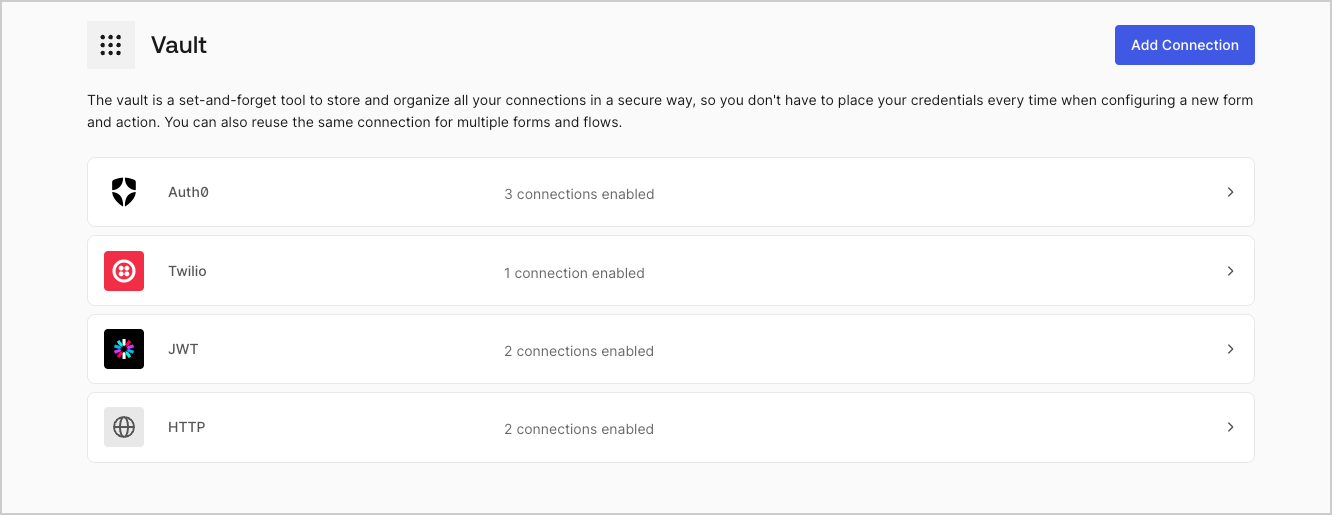
Ajoutez une connexion au coffre-fort depuis la page Coffre-fort en procédant comme suit :

1. Ouvrez l’éditeur de formulaires en sélectionnant **Auth0 Dashboard > Actions > Forms (Formulaires).**

2. En haut à gauche de l’écran, sélectionnez **{"{tenantName}"} > Vault (Coffre-fort)** pour ouvrir la page Vault.
   <Frame>
     <img src="https://mintcdn.com/docs-staging-feat-3pa-xaa-myorgs/69YG0wuqzR4Wori1/docs/images/fr-ca/cdy7uua7fh8z/1sPNPKO6nuEDCuiYGRWSur/d85dc616170eaf2d7d5f321750863ccf/vault-connections-example.png?fit=max&auto=format&n=69YG0wuqzR4Wori1&q=85&s=4dbe4797ec09450eda7a7793015f8a9b" alt="Dashboard > Forms > Vault" data-og-width="1332" width="1332" data-og-height="515" height="515" data-path="docs/images/fr-ca/cdy7uua7fh8z/1sPNPKO6nuEDCuiYGRWSur/d85dc616170eaf2d7d5f321750863ccf/vault-connections-example.png" data-optimize="true" data-opv="3" srcset="https://mintcdn.com/docs-staging-feat-3pa-xaa-myorgs/69YG0wuqzR4Wori1/docs/images/fr-ca/cdy7uua7fh8z/1sPNPKO6nuEDCuiYGRWSur/d85dc616170eaf2d7d5f321750863ccf/vault-connections-example.png?w=280&fit=max&auto=format&n=69YG0wuqzR4Wori1&q=85&s=8be425ed871a94823cb303e71a60aacd 280w, https://mintcdn.com/docs-staging-feat-3pa-xaa-myorgs/69YG0wuqzR4Wori1/docs/images/fr-ca/cdy7uua7fh8z/1sPNPKO6nuEDCuiYGRWSur/d85dc616170eaf2d7d5f321750863ccf/vault-connections-example.png?w=560&fit=max&auto=format&n=69YG0wuqzR4Wori1&q=85&s=2c503320bc6d6b86d47f7bcd9e007d89 560w, https://mintcdn.com/docs-staging-feat-3pa-xaa-myorgs/69YG0wuqzR4Wori1/docs/images/fr-ca/cdy7uua7fh8z/1sPNPKO6nuEDCuiYGRWSur/d85dc616170eaf2d7d5f321750863ccf/vault-connections-example.png?w=840&fit=max&auto=format&n=69YG0wuqzR4Wori1&q=85&s=6c8f23c69456c5cabf047e45c76d8444 840w, https://mintcdn.com/docs-staging-feat-3pa-xaa-myorgs/69YG0wuqzR4Wori1/docs/images/fr-ca/cdy7uua7fh8z/1sPNPKO6nuEDCuiYGRWSur/d85dc616170eaf2d7d5f321750863ccf/vault-connections-example.png?w=1100&fit=max&auto=format&n=69YG0wuqzR4Wori1&q=85&s=a8c3a6f26e067c9a6d114b1b1227ec62 1100w, https://mintcdn.com/docs-staging-feat-3pa-xaa-myorgs/69YG0wuqzR4Wori1/docs/images/fr-ca/cdy7uua7fh8z/1sPNPKO6nuEDCuiYGRWSur/d85dc616170eaf2d7d5f321750863ccf/vault-connections-example.png?w=1650&fit=max&auto=format&n=69YG0wuqzR4Wori1&q=85&s=e79e46fdf5105bc21300efbb60e57d0b 1650w, https://mintcdn.com/docs-staging-feat-3pa-xaa-myorgs/69YG0wuqzR4Wori1/docs/images/fr-ca/cdy7uua7fh8z/1sPNPKO6nuEDCuiYGRWSur/d85dc616170eaf2d7d5f321750863ccf/vault-connections-example.png?w=2500&fit=max&auto=format&n=69YG0wuqzR4Wori1&q=85&s=953961221b2f8ea680cae4a64f233482 2500w" />
   </Frame>

3. Sélectionnez **Add Vault Connection (Ajouter une connexion au coffre-fort)**.

4. Sélectionnez l’action désirée, puis **Continue (Continuer)**.

5. Ajoutez un **Connection name (Nom de connexion)** au coffre-fort et sélectionnez **Continue (Continuer)**.

6. Saisissez les identifiants.
   Si vous n’avez pas d’identifiants précis, vous pouvez sélectionner **Create an empty connection (Créer une connexion vide)** et ajouter les identifiants plus tard. Les connexions vides affichent une icône orange qui indiquent l’absence d’identifiants.

7. Sélectionnez **Add Vault Connection (Ajouter une connexion au coffre-fort)**.

### Créer des connexions au coffre-fort depuis l’éditeur de flux

Ajoutez une connexion au coffre-fort à partir d’une action de flux, par exemple, Twilio, en procédant comme suit :

1. Ouvrez l’éditeur de flux en sélectionnant **Auth0 Dashboard > Actions > Forms (Formulaires) > Flows (Flux)**

2. Sélectionnez un flux et ajoutez une action **Send SMS with Twilio (Envoyer un SMS avec Twilio)**.

3. Dans le paramètre **Vault connection (Connexion au coffre-fort)** de l’action, sélectionnez l’icône **+**.

   <Frame>
     <img src="https://mintcdn.com/docs-staging-feat-3pa-xaa-myorgs/7dN7BGZPE2k0S4rk/docs/images/fr-ca/cdy7uua7fh8z/1AsaznhRKxm5LZxPlcbfUw/10e5a8af700aab909f5b03fcd266da7e/twilio-vault-connection.png?fit=max&auto=format&n=7dN7BGZPE2k0S4rk&q=85&s=8381f4ff006acb0ec37b58c7c48295db" alt="Dashboard > Forms > Vault " data-og-width="1104" width="1104" data-og-height="191" height="191" data-path="docs/images/fr-ca/cdy7uua7fh8z/1AsaznhRKxm5LZxPlcbfUw/10e5a8af700aab909f5b03fcd266da7e/twilio-vault-connection.png" data-optimize="true" data-opv="3" srcset="https://mintcdn.com/docs-staging-feat-3pa-xaa-myorgs/7dN7BGZPE2k0S4rk/docs/images/fr-ca/cdy7uua7fh8z/1AsaznhRKxm5LZxPlcbfUw/10e5a8af700aab909f5b03fcd266da7e/twilio-vault-connection.png?w=280&fit=max&auto=format&n=7dN7BGZPE2k0S4rk&q=85&s=21db53750cac792edccc684db3ea59c5 280w, https://mintcdn.com/docs-staging-feat-3pa-xaa-myorgs/7dN7BGZPE2k0S4rk/docs/images/fr-ca/cdy7uua7fh8z/1AsaznhRKxm5LZxPlcbfUw/10e5a8af700aab909f5b03fcd266da7e/twilio-vault-connection.png?w=560&fit=max&auto=format&n=7dN7BGZPE2k0S4rk&q=85&s=f76ad47f20a14e13b8ff7349cb9efd72 560w, https://mintcdn.com/docs-staging-feat-3pa-xaa-myorgs/7dN7BGZPE2k0S4rk/docs/images/fr-ca/cdy7uua7fh8z/1AsaznhRKxm5LZxPlcbfUw/10e5a8af700aab909f5b03fcd266da7e/twilio-vault-connection.png?w=840&fit=max&auto=format&n=7dN7BGZPE2k0S4rk&q=85&s=6e94b9e7a4a19fc42e101c26bad36a29 840w, https://mintcdn.com/docs-staging-feat-3pa-xaa-myorgs/7dN7BGZPE2k0S4rk/docs/images/fr-ca/cdy7uua7fh8z/1AsaznhRKxm5LZxPlcbfUw/10e5a8af700aab909f5b03fcd266da7e/twilio-vault-connection.png?w=1100&fit=max&auto=format&n=7dN7BGZPE2k0S4rk&q=85&s=fa855aa46867df8fede0b679ebaa3e5f 1100w, https://mintcdn.com/docs-staging-feat-3pa-xaa-myorgs/7dN7BGZPE2k0S4rk/docs/images/fr-ca/cdy7uua7fh8z/1AsaznhRKxm5LZxPlcbfUw/10e5a8af700aab909f5b03fcd266da7e/twilio-vault-connection.png?w=1650&fit=max&auto=format&n=7dN7BGZPE2k0S4rk&q=85&s=503dc5d891f0c3773ddf251415af216c 1650w, https://mintcdn.com/docs-staging-feat-3pa-xaa-myorgs/7dN7BGZPE2k0S4rk/docs/images/fr-ca/cdy7uua7fh8z/1AsaznhRKxm5LZxPlcbfUw/10e5a8af700aab909f5b03fcd266da7e/twilio-vault-connection.png?w=2500&fit=max&auto=format&n=7dN7BGZPE2k0S4rk&q=85&s=03b1dadb975b24c90096ef4dc4ea7006 2500w" />
   </Frame>

4. Ajoutez un **Connection name (Nom de connexion)** au coffre-fort et sélectionnez **Continue (Continuer)**.

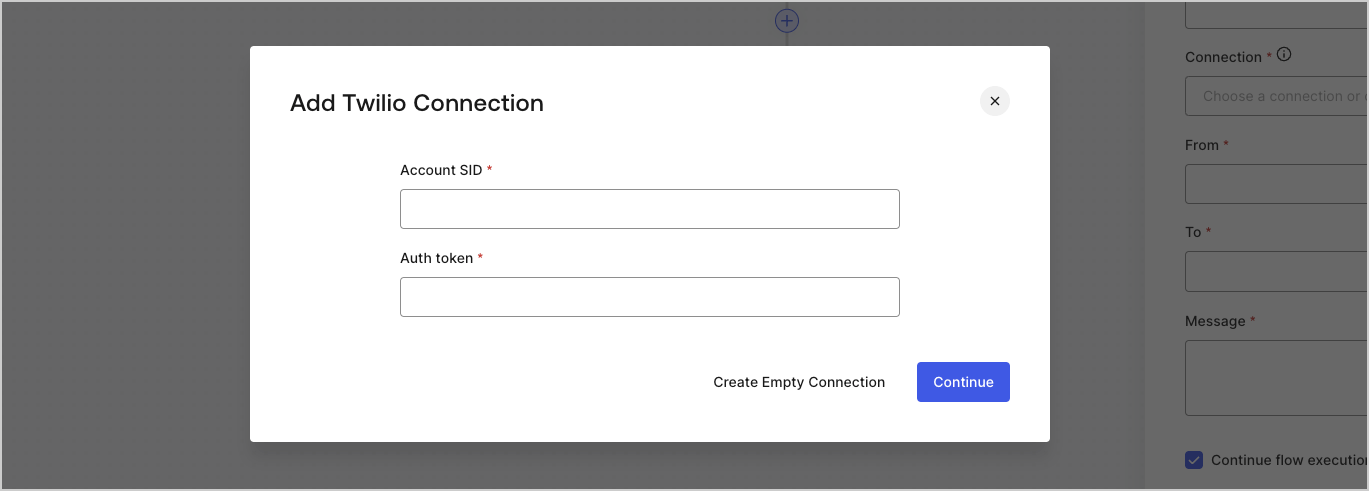
5. Saisissez les identifiants.
   Si vous n’avez pas d’identifiants précis, vous pouvez sélectionner **Create an empty connection (Créer une connexion vide)** et ajouter les identifiants plus tard. Les connexions vides affichent une icône orange qui indiquent l’absence d’identifiants.
   <Frame>
     <img src="https://mintcdn.com/docs-staging-feat-3pa-xaa-myorgs/2QuE-cDmUVhzAyMx/docs/images/fr-ca/cdy7uua7fh8z/yobXanutPRCO3FWek8cOk/bc29e39fb8593cff35e2738234bfe6fe/twilio-vault-settings.png?fit=max&auto=format&n=2QuE-cDmUVhzAyMx&q=85&s=9a4e6dfd4ac86a39e4ec190505509b34" alt="Dashboard > Forms > Vault > Twilio connection settings" data-og-width="1369" width="1369" data-og-height="491" height="491" data-path="docs/images/fr-ca/cdy7uua7fh8z/yobXanutPRCO3FWek8cOk/bc29e39fb8593cff35e2738234bfe6fe/twilio-vault-settings.png" data-optimize="true" data-opv="3" srcset="https://mintcdn.com/docs-staging-feat-3pa-xaa-myorgs/2QuE-cDmUVhzAyMx/docs/images/fr-ca/cdy7uua7fh8z/yobXanutPRCO3FWek8cOk/bc29e39fb8593cff35e2738234bfe6fe/twilio-vault-settings.png?w=280&fit=max&auto=format&n=2QuE-cDmUVhzAyMx&q=85&s=b809bbf7b90fbd62ec57e1fd170d2439 280w, https://mintcdn.com/docs-staging-feat-3pa-xaa-myorgs/2QuE-cDmUVhzAyMx/docs/images/fr-ca/cdy7uua7fh8z/yobXanutPRCO3FWek8cOk/bc29e39fb8593cff35e2738234bfe6fe/twilio-vault-settings.png?w=560&fit=max&auto=format&n=2QuE-cDmUVhzAyMx&q=85&s=dd5a297f2ee36168424b6a8a5ab2d218 560w, https://mintcdn.com/docs-staging-feat-3pa-xaa-myorgs/2QuE-cDmUVhzAyMx/docs/images/fr-ca/cdy7uua7fh8z/yobXanutPRCO3FWek8cOk/bc29e39fb8593cff35e2738234bfe6fe/twilio-vault-settings.png?w=840&fit=max&auto=format&n=2QuE-cDmUVhzAyMx&q=85&s=5c27ad09d941f1ff4692c5fa1290fd6f 840w, https://mintcdn.com/docs-staging-feat-3pa-xaa-myorgs/2QuE-cDmUVhzAyMx/docs/images/fr-ca/cdy7uua7fh8z/yobXanutPRCO3FWek8cOk/bc29e39fb8593cff35e2738234bfe6fe/twilio-vault-settings.png?w=1100&fit=max&auto=format&n=2QuE-cDmUVhzAyMx&q=85&s=a86451bbfd3f1b5d2e52c2a78b5a9b49 1100w, https://mintcdn.com/docs-staging-feat-3pa-xaa-myorgs/2QuE-cDmUVhzAyMx/docs/images/fr-ca/cdy7uua7fh8z/yobXanutPRCO3FWek8cOk/bc29e39fb8593cff35e2738234bfe6fe/twilio-vault-settings.png?w=1650&fit=max&auto=format&n=2QuE-cDmUVhzAyMx&q=85&s=85a4d68d3c8f51f73bcc852a693b0126 1650w, https://mintcdn.com/docs-staging-feat-3pa-xaa-myorgs/2QuE-cDmUVhzAyMx/docs/images/fr-ca/cdy7uua7fh8z/yobXanutPRCO3FWek8cOk/bc29e39fb8593cff35e2738234bfe6fe/twilio-vault-settings.png?w=2500&fit=max&auto=format&n=2QuE-cDmUVhzAyMx&q=85&s=7c897dbc31eab565b9bc71ea4f34a3e4 2500w" />
   </Frame>

6. Sélectionnez **Add Vault Connection (Ajouter une connexion au coffre-fort)**.
