> ## Documentation Index
> Fetch the complete documentation index at: https://docs-staging-feat-3pa-xaa-myorgs.mintlify.site/llms.txt
> Use this file to discover all available pages before exploring further.

> Learn how to configure an update policy form using Forms for Actions for users to review and accept new terms of service or consent updates.

# Use Cases: Configure an update policy form using Forms

<Card title="Before you start">
  1. Create a [Machine-to-Machine Application](/docs/get-started/auth0-overview/create-applications/machine-to-machine-apps) with the following scopes enabled:

  * `read:users`
  * `update:users`
  * `create:users`
  * `read:users_app_metadata`
  * `update:users_app_metadata`
  * `create:users_app_metadata`

  2. Add a [Vault connection](/docs/customize/forms/vault) using the M2M application credentials.
</Card>

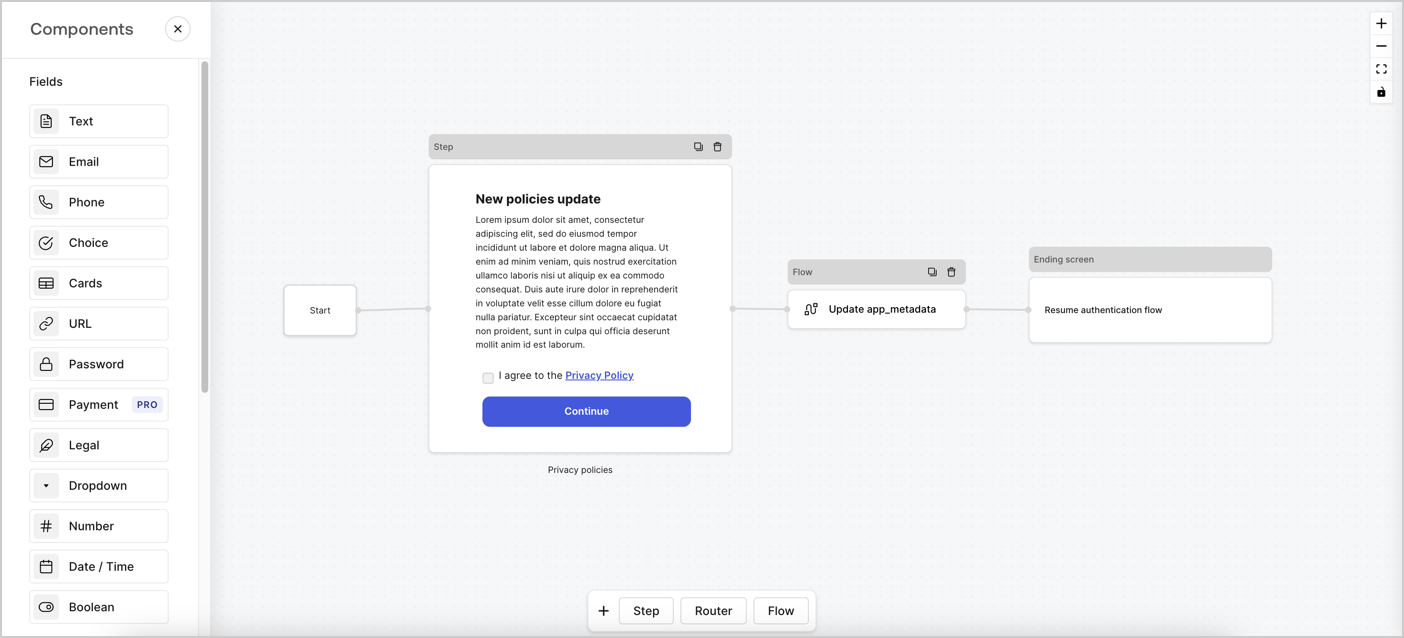
Forms for Actions allows you to create custom privacy policies flows and store the consent under the `app_metadata` object.
<Frame>
  <img src="https://mintcdn.com/docs-staging-feat-3pa-xaa-myorgs/o6iC7qSojJ5jhn5w/docs/images/cdy7uua7fh8z/6i68dMvHDTijfRmSgN1x8Q/ad900e7d4c0fb34645921435472b8684/privavy-policy-form.png?fit=max&auto=format&n=o6iC7qSojJ5jhn5w&q=85&s=f85b4f688a374827f28adb6ded2c410a" alt="Dashboard > Actions > Forms > Privacy policy use case" data-og-width="1404" width="1404" data-og-height="638" height="638" data-path="docs/images/cdy7uua7fh8z/6i68dMvHDTijfRmSgN1x8Q/ad900e7d4c0fb34645921435472b8684/privavy-policy-form.png" data-optimize="true" data-opv="3" srcset="https://mintcdn.com/docs-staging-feat-3pa-xaa-myorgs/o6iC7qSojJ5jhn5w/docs/images/cdy7uua7fh8z/6i68dMvHDTijfRmSgN1x8Q/ad900e7d4c0fb34645921435472b8684/privavy-policy-form.png?w=280&fit=max&auto=format&n=o6iC7qSojJ5jhn5w&q=85&s=5dbebc128319c2ff31db98e59be598f2 280w, https://mintcdn.com/docs-staging-feat-3pa-xaa-myorgs/o6iC7qSojJ5jhn5w/docs/images/cdy7uua7fh8z/6i68dMvHDTijfRmSgN1x8Q/ad900e7d4c0fb34645921435472b8684/privavy-policy-form.png?w=560&fit=max&auto=format&n=o6iC7qSojJ5jhn5w&q=85&s=ae95942ce09b8aef582954ac8285257c 560w, https://mintcdn.com/docs-staging-feat-3pa-xaa-myorgs/o6iC7qSojJ5jhn5w/docs/images/cdy7uua7fh8z/6i68dMvHDTijfRmSgN1x8Q/ad900e7d4c0fb34645921435472b8684/privavy-policy-form.png?w=840&fit=max&auto=format&n=o6iC7qSojJ5jhn5w&q=85&s=45c7902a6b695512320cffd94c0a4671 840w, https://mintcdn.com/docs-staging-feat-3pa-xaa-myorgs/o6iC7qSojJ5jhn5w/docs/images/cdy7uua7fh8z/6i68dMvHDTijfRmSgN1x8Q/ad900e7d4c0fb34645921435472b8684/privavy-policy-form.png?w=1100&fit=max&auto=format&n=o6iC7qSojJ5jhn5w&q=85&s=90294cae048f7861dc98e39244f8ef77 1100w, https://mintcdn.com/docs-staging-feat-3pa-xaa-myorgs/o6iC7qSojJ5jhn5w/docs/images/cdy7uua7fh8z/6i68dMvHDTijfRmSgN1x8Q/ad900e7d4c0fb34645921435472b8684/privavy-policy-form.png?w=1650&fit=max&auto=format&n=o6iC7qSojJ5jhn5w&q=85&s=1103cf9b464d45ce4a41e0d351355547 1650w, https://mintcdn.com/docs-staging-feat-3pa-xaa-myorgs/o6iC7qSojJ5jhn5w/docs/images/cdy7uua7fh8z/6i68dMvHDTijfRmSgN1x8Q/ad900e7d4c0fb34645921435472b8684/privavy-policy-form.png?w=2500&fit=max&auto=format&n=o6iC7qSojJ5jhn5w&q=85&s=cbe72c4fa8c15a5fb341472bc43da6b0 2500w" />
</Frame>

The sections below outline how you can create an Update Policy form using nodes and flows, along with steps for adding your form to a [Post Login](/docs/customize/actions/explore-triggers/signup-and-login-triggers/login-trigger) Action.

## Create a form from scratch

Follow these steps to create a form to gather information:

1. Open the Form editor by selecting **Auth0 Dashboard > Actions > Forms.**
2. Select **Create Form** > **Start from scratch**.

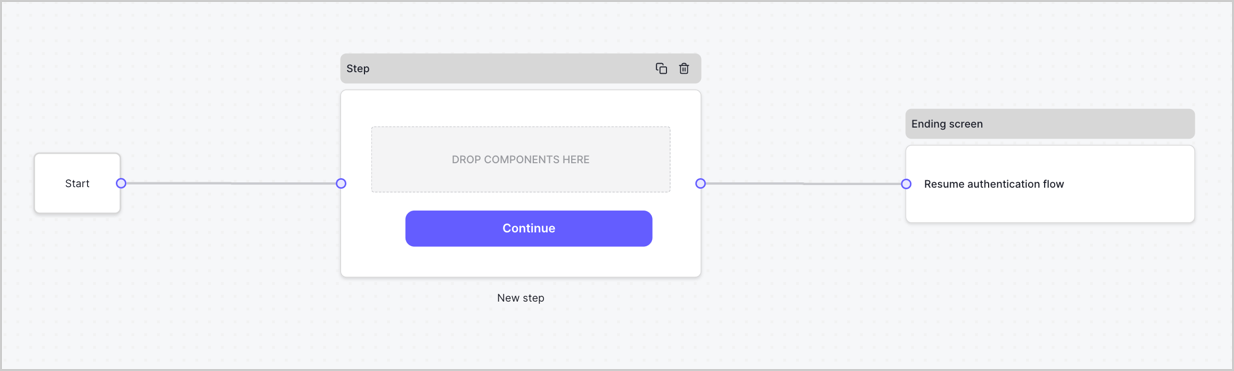
By default, a new form contains a Start node, a Step node, and an Ending screen node.
<Frame>
  <img src="https://mintcdn.com/docs-staging-feat-3pa-xaa-myorgs/Jb-hxL5FAdp_KI14/docs/images/cdy7uua7fh8z/2TZ9jSjgEcARFpULI6hz4R/a4319a1bd482f2ee5cc23100fdb2f42c/New-form-Forms-for-action-use-case.png?fit=max&auto=format&n=Jb-hxL5FAdp_KI14&q=85&s=52f42f9dba7926123254d4598babf422" alt="Dashboard > Forms > Use Cases > Form" data-og-width="1234" width="1234" data-og-height="371" height="371" data-path="docs/images/cdy7uua7fh8z/2TZ9jSjgEcARFpULI6hz4R/a4319a1bd482f2ee5cc23100fdb2f42c/New-form-Forms-for-action-use-case.png" data-optimize="true" data-opv="3" srcset="https://mintcdn.com/docs-staging-feat-3pa-xaa-myorgs/Jb-hxL5FAdp_KI14/docs/images/cdy7uua7fh8z/2TZ9jSjgEcARFpULI6hz4R/a4319a1bd482f2ee5cc23100fdb2f42c/New-form-Forms-for-action-use-case.png?w=280&fit=max&auto=format&n=Jb-hxL5FAdp_KI14&q=85&s=ff14aa1f237226d51ba8d0b4bf677dac 280w, https://mintcdn.com/docs-staging-feat-3pa-xaa-myorgs/Jb-hxL5FAdp_KI14/docs/images/cdy7uua7fh8z/2TZ9jSjgEcARFpULI6hz4R/a4319a1bd482f2ee5cc23100fdb2f42c/New-form-Forms-for-action-use-case.png?w=560&fit=max&auto=format&n=Jb-hxL5FAdp_KI14&q=85&s=c9ea5516fee328cca6e9d753e60342b6 560w, https://mintcdn.com/docs-staging-feat-3pa-xaa-myorgs/Jb-hxL5FAdp_KI14/docs/images/cdy7uua7fh8z/2TZ9jSjgEcARFpULI6hz4R/a4319a1bd482f2ee5cc23100fdb2f42c/New-form-Forms-for-action-use-case.png?w=840&fit=max&auto=format&n=Jb-hxL5FAdp_KI14&q=85&s=4085ebf010a0532ee3af4ec7e91efabe 840w, https://mintcdn.com/docs-staging-feat-3pa-xaa-myorgs/Jb-hxL5FAdp_KI14/docs/images/cdy7uua7fh8z/2TZ9jSjgEcARFpULI6hz4R/a4319a1bd482f2ee5cc23100fdb2f42c/New-form-Forms-for-action-use-case.png?w=1100&fit=max&auto=format&n=Jb-hxL5FAdp_KI14&q=85&s=0dc2ab363ff123b6cd77a2e183cae71d 1100w, https://mintcdn.com/docs-staging-feat-3pa-xaa-myorgs/Jb-hxL5FAdp_KI14/docs/images/cdy7uua7fh8z/2TZ9jSjgEcARFpULI6hz4R/a4319a1bd482f2ee5cc23100fdb2f42c/New-form-Forms-for-action-use-case.png?w=1650&fit=max&auto=format&n=Jb-hxL5FAdp_KI14&q=85&s=b52c5495315be8b95ce933c7219e5c2d 1650w, https://mintcdn.com/docs-staging-feat-3pa-xaa-myorgs/Jb-hxL5FAdp_KI14/docs/images/cdy7uua7fh8z/2TZ9jSjgEcARFpULI6hz4R/a4319a1bd482f2ee5cc23100fdb2f42c/New-form-Forms-for-action-use-case.png?w=2500&fit=max&auto=format&n=Jb-hxL5FAdp_KI14&q=85&s=4dec372acc2eaa6e0a7e6cf342c8f939 2500w" />
</Frame>

### Configure the Step node

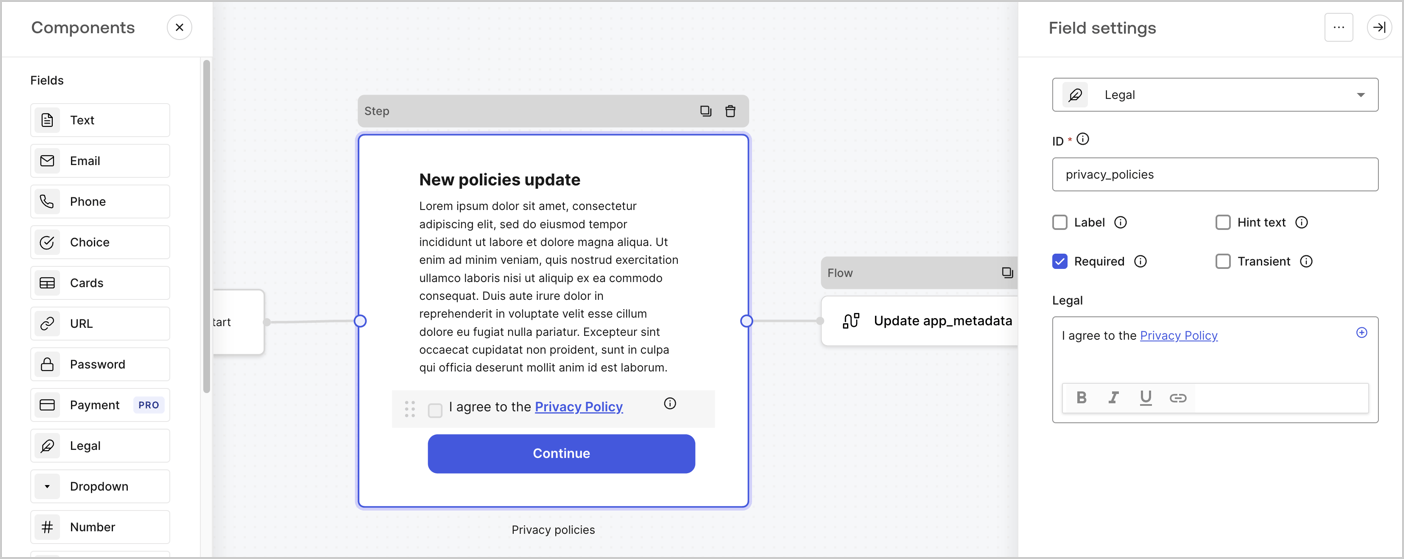
The Step node is the graphical interface visible to users. Add [Fields](/docs/customize/forms/nodes-and-components) to the Step node to collect the new agreement acceptance value by following these steps:

1. Drag a **Rich text** field from the **Components menu** into the **Step** node.

   * **Rich text**: Enter a description of your privacy policies updates.
   * Select **Save**.
2. Drag a **Legal** field into the **Step** node.

   * **ID**: Enter `privacy_policies`.
   * **Required**: Enable the checkbox.
   * **Legal**: Enter `I agree to the Privacy Policy`.
   * Select **Save**.
3. Select **Publish** to save.
<Frame>
  <img src="https://mintcdn.com/docs-staging-feat-3pa-xaa-myorgs/QbrsVloGt0aPQNf6/docs/images/cdy7uua7fh8z/59zFFjQjAnjogkc2QGIqqJ/0ad66b1b636544122aa4e65968b76c2c/privacy-policy-step-node.png?fit=max&auto=format&n=QbrsVloGt0aPQNf6&q=85&s=7892666770966eea34d166d21fd85a94" alt="Dashboard > Actions > Forms > Use case privacy policy step node" data-og-width="1404" width="1404" data-og-height="559" height="559" data-path="docs/images/cdy7uua7fh8z/59zFFjQjAnjogkc2QGIqqJ/0ad66b1b636544122aa4e65968b76c2c/privacy-policy-step-node.png" data-optimize="true" data-opv="3" srcset="https://mintcdn.com/docs-staging-feat-3pa-xaa-myorgs/QbrsVloGt0aPQNf6/docs/images/cdy7uua7fh8z/59zFFjQjAnjogkc2QGIqqJ/0ad66b1b636544122aa4e65968b76c2c/privacy-policy-step-node.png?w=280&fit=max&auto=format&n=QbrsVloGt0aPQNf6&q=85&s=34622b1cc826b15763fca603576e529d 280w, https://mintcdn.com/docs-staging-feat-3pa-xaa-myorgs/QbrsVloGt0aPQNf6/docs/images/cdy7uua7fh8z/59zFFjQjAnjogkc2QGIqqJ/0ad66b1b636544122aa4e65968b76c2c/privacy-policy-step-node.png?w=560&fit=max&auto=format&n=QbrsVloGt0aPQNf6&q=85&s=066f772bf1f6fbc55be2017b21a8189b 560w, https://mintcdn.com/docs-staging-feat-3pa-xaa-myorgs/QbrsVloGt0aPQNf6/docs/images/cdy7uua7fh8z/59zFFjQjAnjogkc2QGIqqJ/0ad66b1b636544122aa4e65968b76c2c/privacy-policy-step-node.png?w=840&fit=max&auto=format&n=QbrsVloGt0aPQNf6&q=85&s=4945ede4199ccc8f95af0e126d92b71c 840w, https://mintcdn.com/docs-staging-feat-3pa-xaa-myorgs/QbrsVloGt0aPQNf6/docs/images/cdy7uua7fh8z/59zFFjQjAnjogkc2QGIqqJ/0ad66b1b636544122aa4e65968b76c2c/privacy-policy-step-node.png?w=1100&fit=max&auto=format&n=QbrsVloGt0aPQNf6&q=85&s=25c2a1304ea8d9d55a088960ae97f391 1100w, https://mintcdn.com/docs-staging-feat-3pa-xaa-myorgs/QbrsVloGt0aPQNf6/docs/images/cdy7uua7fh8z/59zFFjQjAnjogkc2QGIqqJ/0ad66b1b636544122aa4e65968b76c2c/privacy-policy-step-node.png?w=1650&fit=max&auto=format&n=QbrsVloGt0aPQNf6&q=85&s=dce5b59c88a7febd4b39cba954f02902 1650w, https://mintcdn.com/docs-staging-feat-3pa-xaa-myorgs/QbrsVloGt0aPQNf6/docs/images/cdy7uua7fh8z/59zFFjQjAnjogkc2QGIqqJ/0ad66b1b636544122aa4e65968b76c2c/privacy-policy-step-node.png?w=2500&fit=max&auto=format&n=QbrsVloGt0aPQNf6&q=85&s=91b86271f5cc030de9560d3bb6183e64 2500w" />
</Frame>

### Configure the Flow node

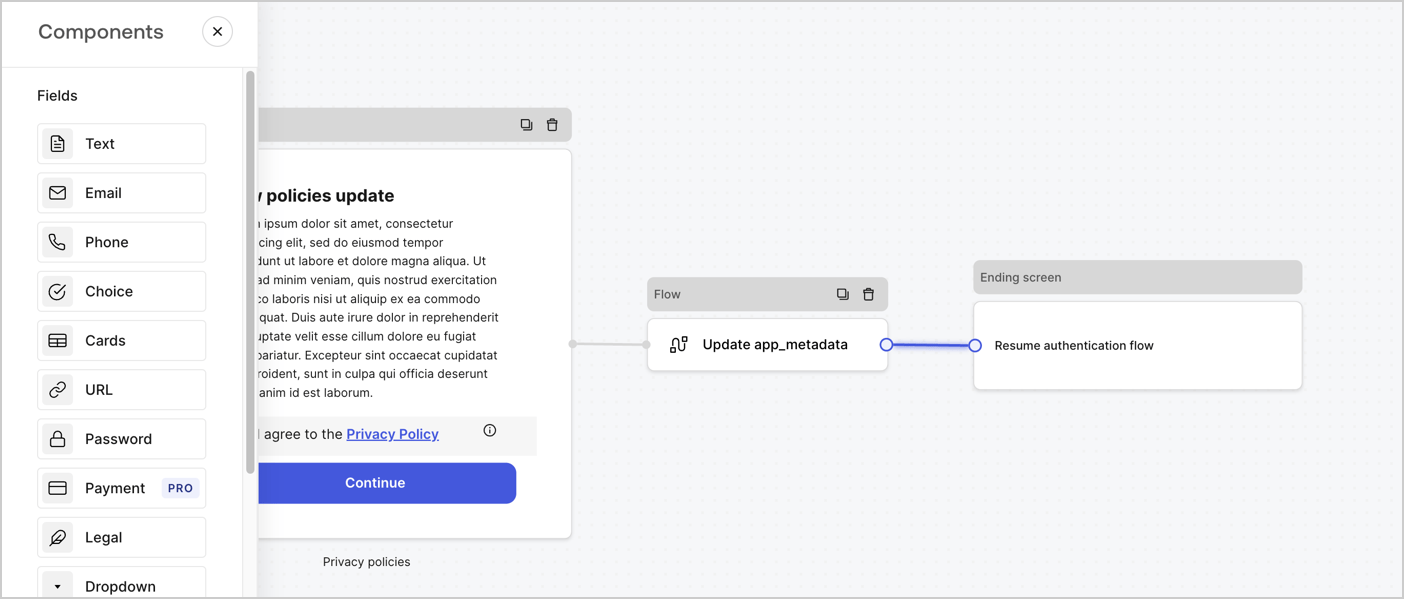
Add a **Flow** node after the **Step** node to update the `app_metadata` and resume the authentication flow by following these steps:

1. Select **Flow** from the bottom of the Form editor.
2. Remove the existing link between the **Step** and **Ending Screen** nodes.
3. Select the new **Flow** > **Click to add a flow** > **Create a new flow.**

   * Enter `Update app_metadata` in the **Name** field.
   * Select **Create**.
   * Select **Save**.
4. Link the **Flow** node to the **Step** and **Ending Screen** nodes as pictured below.
5. Select **Publish** to save.
<Frame>
  <img src="https://mintcdn.com/docs-staging-feat-3pa-xaa-myorgs/o6iC7qSojJ5jhn5w/docs/images/cdy7uua7fh8z/6YIkzm7SrpM9LW76AXuRzh/353c518fe82bbaa440836da1d83596d6/link-policies.png?fit=max&auto=format&n=o6iC7qSojJ5jhn5w&q=85&s=62c92dac7293fabb6b0a133a2734fed1" alt="Dashboard > Actions > Forms > Form" data-og-width="1404" width="1404" data-og-height="599" height="599" data-path="docs/images/cdy7uua7fh8z/6YIkzm7SrpM9LW76AXuRzh/353c518fe82bbaa440836da1d83596d6/link-policies.png" data-optimize="true" data-opv="3" srcset="https://mintcdn.com/docs-staging-feat-3pa-xaa-myorgs/o6iC7qSojJ5jhn5w/docs/images/cdy7uua7fh8z/6YIkzm7SrpM9LW76AXuRzh/353c518fe82bbaa440836da1d83596d6/link-policies.png?w=280&fit=max&auto=format&n=o6iC7qSojJ5jhn5w&q=85&s=80183b9bcbc7de8b90759738ceba1ab9 280w, https://mintcdn.com/docs-staging-feat-3pa-xaa-myorgs/o6iC7qSojJ5jhn5w/docs/images/cdy7uua7fh8z/6YIkzm7SrpM9LW76AXuRzh/353c518fe82bbaa440836da1d83596d6/link-policies.png?w=560&fit=max&auto=format&n=o6iC7qSojJ5jhn5w&q=85&s=38e3e9ca04479269f20e713c102574eb 560w, https://mintcdn.com/docs-staging-feat-3pa-xaa-myorgs/o6iC7qSojJ5jhn5w/docs/images/cdy7uua7fh8z/6YIkzm7SrpM9LW76AXuRzh/353c518fe82bbaa440836da1d83596d6/link-policies.png?w=840&fit=max&auto=format&n=o6iC7qSojJ5jhn5w&q=85&s=d3795b5d5dd545ce7103f267db993bb7 840w, https://mintcdn.com/docs-staging-feat-3pa-xaa-myorgs/o6iC7qSojJ5jhn5w/docs/images/cdy7uua7fh8z/6YIkzm7SrpM9LW76AXuRzh/353c518fe82bbaa440836da1d83596d6/link-policies.png?w=1100&fit=max&auto=format&n=o6iC7qSojJ5jhn5w&q=85&s=0269523d1a747c00b97aefc8696b4153 1100w, https://mintcdn.com/docs-staging-feat-3pa-xaa-myorgs/o6iC7qSojJ5jhn5w/docs/images/cdy7uua7fh8z/6YIkzm7SrpM9LW76AXuRzh/353c518fe82bbaa440836da1d83596d6/link-policies.png?w=1650&fit=max&auto=format&n=o6iC7qSojJ5jhn5w&q=85&s=0061a85bd9f58167a5fae9e25e02d859 1650w, https://mintcdn.com/docs-staging-feat-3pa-xaa-myorgs/o6iC7qSojJ5jhn5w/docs/images/cdy7uua7fh8z/6YIkzm7SrpM9LW76AXuRzh/353c518fe82bbaa440836da1d83596d6/link-policies.png?w=2500&fit=max&auto=format&n=o6iC7qSojJ5jhn5w&q=85&s=4a14cbe5466740f33dc10e97e663eb45 2500w" />
</Frame>

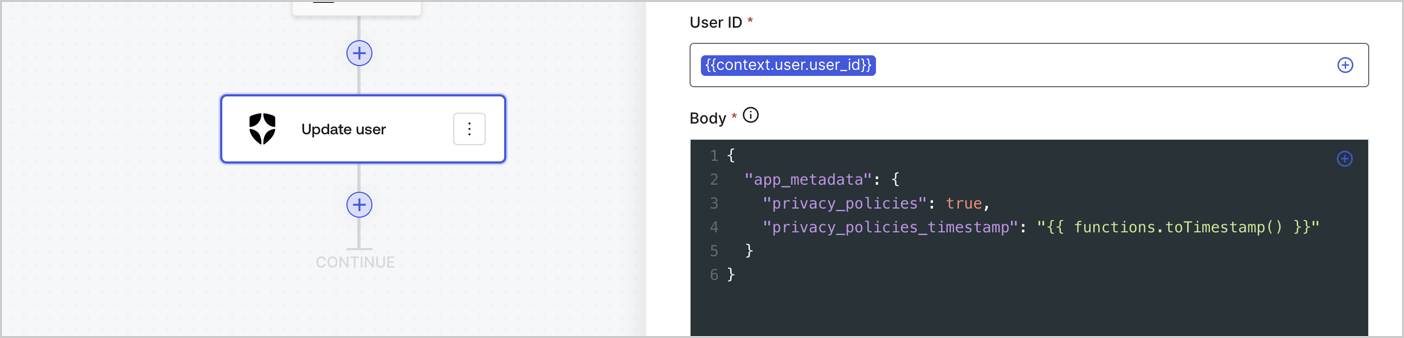
Add an Auth0 Update user action to the flow by following these steps:

1. Select the **Flow** **Update app\_metadata** > **Edit flow** to open the Flow editor in a new tab.
2. Below the StartAction, select the **+** icon to add an **Update user** action. Complete the fields below, then select **Save** to continue.

   * **Connection**: Select from the dropdown the Vault connection to your M2M application.

   * **User ID**: Enter `{{context.user.user_id}}`.

   * **Body**: Copy and paste the following code to update the app\_metadata with the privacy\_policies and privacy\_policies\_timestamp properties.

     ```text lines theme={null}
     {
       "app_metadata": {
         "privacy_policies": true,
         "privacy_policies_timestamp": "{{ functions.toTimestamp() }}"
       }
     }
     ```

   * Select **Save**.
3. Select **Publish** to save.
<Frame>
  <img src="https://mintcdn.com/docs-staging-feat-3pa-xaa-myorgs/kwTg-ogflDWHALVK/docs/images/cdy7uua7fh8z/CvMNIwWrOUwaFW4X3G28p/1fb70ae57a20749d9ffaaba8dc0b7e26/update-user-privacy.png?fit=max&auto=format&n=kwTg-ogflDWHALVK&q=85&s=329314ab24c6415ee727e5bce65a9224" alt="Dashboard > Actions > Forms > User case privacy policy code" data-og-width="1404" width="1404" data-og-height="338" height="338" data-path="docs/images/cdy7uua7fh8z/CvMNIwWrOUwaFW4X3G28p/1fb70ae57a20749d9ffaaba8dc0b7e26/update-user-privacy.png" data-optimize="true" data-opv="3" srcset="https://mintcdn.com/docs-staging-feat-3pa-xaa-myorgs/kwTg-ogflDWHALVK/docs/images/cdy7uua7fh8z/CvMNIwWrOUwaFW4X3G28p/1fb70ae57a20749d9ffaaba8dc0b7e26/update-user-privacy.png?w=280&fit=max&auto=format&n=kwTg-ogflDWHALVK&q=85&s=0fec47ed8dea84f66785c15bd6ddc280 280w, https://mintcdn.com/docs-staging-feat-3pa-xaa-myorgs/kwTg-ogflDWHALVK/docs/images/cdy7uua7fh8z/CvMNIwWrOUwaFW4X3G28p/1fb70ae57a20749d9ffaaba8dc0b7e26/update-user-privacy.png?w=560&fit=max&auto=format&n=kwTg-ogflDWHALVK&q=85&s=db13f19693965cf8be29aa73fa948ee1 560w, https://mintcdn.com/docs-staging-feat-3pa-xaa-myorgs/kwTg-ogflDWHALVK/docs/images/cdy7uua7fh8z/CvMNIwWrOUwaFW4X3G28p/1fb70ae57a20749d9ffaaba8dc0b7e26/update-user-privacy.png?w=840&fit=max&auto=format&n=kwTg-ogflDWHALVK&q=85&s=e9f49b01e07c72b8d99ec2619959034c 840w, https://mintcdn.com/docs-staging-feat-3pa-xaa-myorgs/kwTg-ogflDWHALVK/docs/images/cdy7uua7fh8z/CvMNIwWrOUwaFW4X3G28p/1fb70ae57a20749d9ffaaba8dc0b7e26/update-user-privacy.png?w=1100&fit=max&auto=format&n=kwTg-ogflDWHALVK&q=85&s=1052bf13550df967c56dc2ed1d1e98a3 1100w, https://mintcdn.com/docs-staging-feat-3pa-xaa-myorgs/kwTg-ogflDWHALVK/docs/images/cdy7uua7fh8z/CvMNIwWrOUwaFW4X3G28p/1fb70ae57a20749d9ffaaba8dc0b7e26/update-user-privacy.png?w=1650&fit=max&auto=format&n=kwTg-ogflDWHALVK&q=85&s=95662a54619026685dc90d3856451b3f 1650w, https://mintcdn.com/docs-staging-feat-3pa-xaa-myorgs/kwTg-ogflDWHALVK/docs/images/cdy7uua7fh8z/CvMNIwWrOUwaFW4X3G28p/1fb70ae57a20749d9ffaaba8dc0b7e26/update-user-privacy.png?w=2500&fit=max&auto=format&n=kwTg-ogflDWHALVK&q=85&s=79d774cca550b1f78b47696eadbf238b 2500w" />
</Frame>

<Callout icon="file-lines" color="#0EA5E9" iconType="regular">
  The flow **Update app\_metadata** adds a `privacy_policies true` value to the app`_metadata` object and also generates a timestamp with a [helper function.](/docs/customize/forms/variables)
</Callout>

## Retrieve the form render code

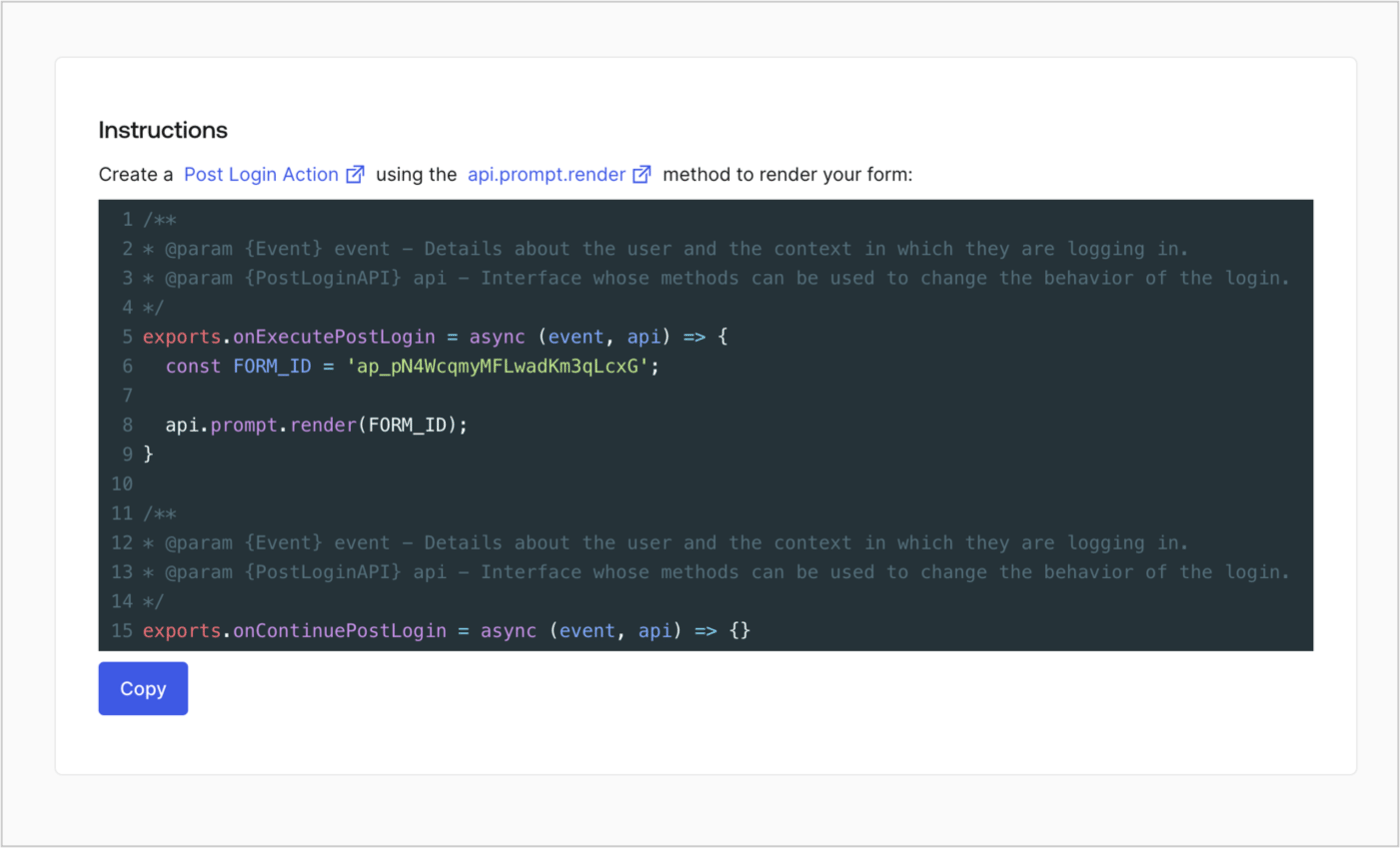
Retrieve your form render code to visually render the form with a custom Post Login Action by following these steps:

* From the Form editor, select **`<> Render`**.
* Select **Copy**.
<Frame>
  <img src="https://mintcdn.com/docs-staging-feat-3pa-xaa-myorgs/ZioQIy50y890cXaT/docs/images/cdy7uua7fh8z/2EIUzc539sq9lwoTKbjoJv/496a864c0fc44a782c9cadca119dbfb0/embed.png?fit=max&auto=format&n=ZioQIy50y890cXaT&q=85&s=29df3970ed5c4d6ab9c10c507d48359d" alt="Dashboard > Actions > Forms > Form > Embed" data-og-width="1400" width="1400" data-og-height="848" height="848" data-path="docs/images/cdy7uua7fh8z/2EIUzc539sq9lwoTKbjoJv/496a864c0fc44a782c9cadca119dbfb0/embed.png" data-optimize="true" data-opv="3" srcset="https://mintcdn.com/docs-staging-feat-3pa-xaa-myorgs/ZioQIy50y890cXaT/docs/images/cdy7uua7fh8z/2EIUzc539sq9lwoTKbjoJv/496a864c0fc44a782c9cadca119dbfb0/embed.png?w=280&fit=max&auto=format&n=ZioQIy50y890cXaT&q=85&s=4d11b2fdd3206f6c9acc5e79819ceb0d 280w, https://mintcdn.com/docs-staging-feat-3pa-xaa-myorgs/ZioQIy50y890cXaT/docs/images/cdy7uua7fh8z/2EIUzc539sq9lwoTKbjoJv/496a864c0fc44a782c9cadca119dbfb0/embed.png?w=560&fit=max&auto=format&n=ZioQIy50y890cXaT&q=85&s=46f2923f7aec631da0392c2085a0c66c 560w, https://mintcdn.com/docs-staging-feat-3pa-xaa-myorgs/ZioQIy50y890cXaT/docs/images/cdy7uua7fh8z/2EIUzc539sq9lwoTKbjoJv/496a864c0fc44a782c9cadca119dbfb0/embed.png?w=840&fit=max&auto=format&n=ZioQIy50y890cXaT&q=85&s=08e2d31bee100298cf998a85654ebad6 840w, https://mintcdn.com/docs-staging-feat-3pa-xaa-myorgs/ZioQIy50y890cXaT/docs/images/cdy7uua7fh8z/2EIUzc539sq9lwoTKbjoJv/496a864c0fc44a782c9cadca119dbfb0/embed.png?w=1100&fit=max&auto=format&n=ZioQIy50y890cXaT&q=85&s=f64679dac343c7db14e171d38f9f8cd5 1100w, https://mintcdn.com/docs-staging-feat-3pa-xaa-myorgs/ZioQIy50y890cXaT/docs/images/cdy7uua7fh8z/2EIUzc539sq9lwoTKbjoJv/496a864c0fc44a782c9cadca119dbfb0/embed.png?w=1650&fit=max&auto=format&n=ZioQIy50y890cXaT&q=85&s=2b2722e566da47ff7d13cabe6ab05efc 1650w, https://mintcdn.com/docs-staging-feat-3pa-xaa-myorgs/ZioQIy50y890cXaT/docs/images/cdy7uua7fh8z/2EIUzc539sq9lwoTKbjoJv/496a864c0fc44a782c9cadca119dbfb0/embed.png?w=2500&fit=max&auto=format&n=ZioQIy50y890cXaT&q=85&s=12d35f50b753b7f95d4b65c2cf179f45 2500w" />
</Frame>

## Create a Post Login Action

Create a post-login Action to render your form by following these steps:

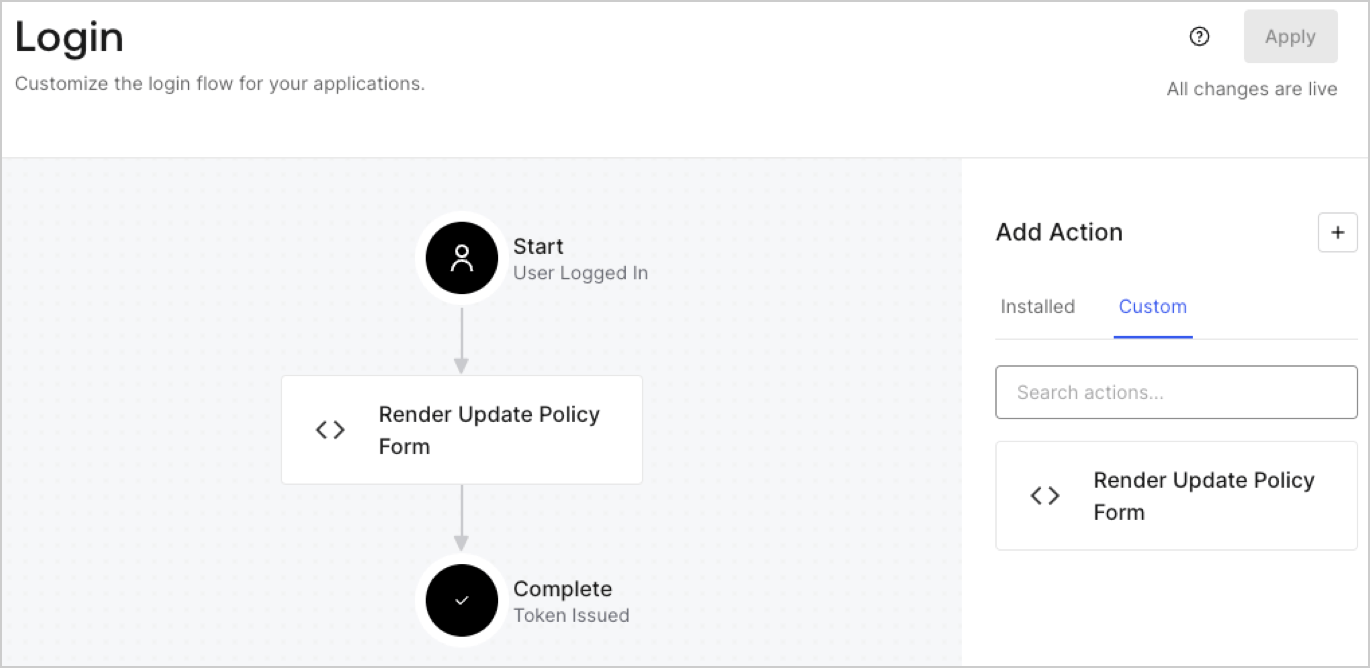
1. Navigate to **Auth0 Dashboard > Actions > Flows > Login.**
2. Select the **+** icon and Select **Build from scratch**:

   * **Name**: Enter `Render Update Policy Form`.
   * **Trigger**: Select `Login / Post Login`.
   * **Runtime**: Select the recommended version.
3. Select **Create**.

To configure the post-login Action:

1. Delete the existing code from the Code editor.
2. Paste the form render code into the Code editor.
3. Edit the code to define the conditional logic that will render the form.

   ```javascript lines theme={null}
   /**
   * @param {Event} event - Details about the user and the context in which they are logging in.
   * @param {PostLoginAPI} api - Interface whose methods can be used to change the behavior of the login.
   */
   exports.onExecutePostLogin = async (event, api) => {
     const FORM_ID = 'REPLACE_WITH_YOUR_FORM_ID';

     if (event.user.app_metadata.privacy_policies !== true) {
       api.prompt.render(FORM_ID);
     }
   }

   exports.onContinuePostLogin = async (event, api) => { }
   ```

   <Callout icon="file-lines" color="#0EA5E9" iconType="regular">
     The example code above will render the form when a user is missing the app metadata `privacy_policies` property.
   </Callout>
4. Select **Deploy.**
5. Drag and Drop the **Render Update Policy Form** Action to the **Login** flow.
   <Frame>
     <img src="https://mintcdn.com/docs-staging-feat-3pa-xaa-myorgs/xSw22doV6zd7N-pi/docs/images/cdy7uua7fh8z/5TOwDgevZsBqd7yZynUYWU/41ca909dc3007aed4f40ff794a05efa5/postlogin.png?fit=max&auto=format&n=xSw22doV6zd7N-pi&q=85&s=a0ffd53d6d51f3be434df5c7d2fa62ae" alt="Dashboard > Forms > Use Case > Render update policy form login action" data-og-width="1370" width="1370" data-og-height="668" height="668" data-path="docs/images/cdy7uua7fh8z/5TOwDgevZsBqd7yZynUYWU/41ca909dc3007aed4f40ff794a05efa5/postlogin.png" data-optimize="true" data-opv="3" srcset="https://mintcdn.com/docs-staging-feat-3pa-xaa-myorgs/xSw22doV6zd7N-pi/docs/images/cdy7uua7fh8z/5TOwDgevZsBqd7yZynUYWU/41ca909dc3007aed4f40ff794a05efa5/postlogin.png?w=280&fit=max&auto=format&n=xSw22doV6zd7N-pi&q=85&s=06c0d54faf203857efd841395c77c58a 280w, https://mintcdn.com/docs-staging-feat-3pa-xaa-myorgs/xSw22doV6zd7N-pi/docs/images/cdy7uua7fh8z/5TOwDgevZsBqd7yZynUYWU/41ca909dc3007aed4f40ff794a05efa5/postlogin.png?w=560&fit=max&auto=format&n=xSw22doV6zd7N-pi&q=85&s=c8fffd3d205a8566c581a40f03f5ce28 560w, https://mintcdn.com/docs-staging-feat-3pa-xaa-myorgs/xSw22doV6zd7N-pi/docs/images/cdy7uua7fh8z/5TOwDgevZsBqd7yZynUYWU/41ca909dc3007aed4f40ff794a05efa5/postlogin.png?w=840&fit=max&auto=format&n=xSw22doV6zd7N-pi&q=85&s=0170c61dd7d1d1dedfb03024d96f7c67 840w, https://mintcdn.com/docs-staging-feat-3pa-xaa-myorgs/xSw22doV6zd7N-pi/docs/images/cdy7uua7fh8z/5TOwDgevZsBqd7yZynUYWU/41ca909dc3007aed4f40ff794a05efa5/postlogin.png?w=1100&fit=max&auto=format&n=xSw22doV6zd7N-pi&q=85&s=50e301489a8e0ad2b0635b8a040ba556 1100w, https://mintcdn.com/docs-staging-feat-3pa-xaa-myorgs/xSw22doV6zd7N-pi/docs/images/cdy7uua7fh8z/5TOwDgevZsBqd7yZynUYWU/41ca909dc3007aed4f40ff794a05efa5/postlogin.png?w=1650&fit=max&auto=format&n=xSw22doV6zd7N-pi&q=85&s=064baebefe7d044571230f658ce30935 1650w, https://mintcdn.com/docs-staging-feat-3pa-xaa-myorgs/xSw22doV6zd7N-pi/docs/images/cdy7uua7fh8z/5TOwDgevZsBqd7yZynUYWU/41ca909dc3007aed4f40ff794a05efa5/postlogin.png?w=2500&fit=max&auto=format&n=xSw22doV6zd7N-pi&q=85&s=6eeb962ba0216cf639144e96c01f336f 2500w" />
   </Frame>
6. Select **Apply.**

### Test implementation

Test the implementation by following these steps:

1. Log in with an existing user whose app`_metadata` attribute `privacy_policies` does not have a value.
2. The post-login Action in the Login flow will render the form and prompt for acceptance.
3. Select **Auth0 Dashboard > User Management > Users,** locate the user and verify that the `app_metadata` attribute `privacy_policies` contains a `true` value and a timestamp.
